Copilot Office integration: Microsoft Copilot Adds Word, Excel and PowerPoint
Copilot Office integration now brings Word, Excel and PowerPoint into the assistant, with files still editable in Office. Here’s what users should know.
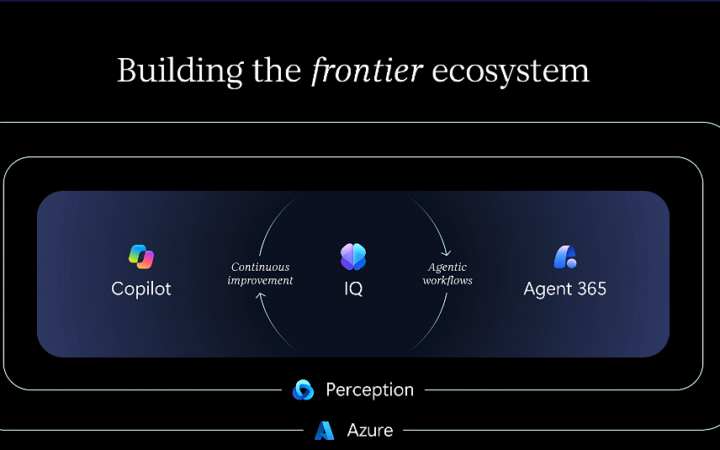
Copilot Office integration — Microsoft Copilot now includes Word, Excel and PowerPoint, letting users create documents, spreadsheets and presentations within the AI assistant while keeping the resulting files editable
Key takeaways
- Microsoft Copilot integration brings Word, Excel and PowerPoint into the assistant so users can create those files there.
- Files made in Copilot remain editable in the corresponding Office applications.
- Microsoft’s longer-term vision places AI agents at the center of work, using organizational information for context.
What changed: Copilot integration brings Office into the assistant
Microsoft has made Word, Excel and PowerPoint generally available inside Copilot. Users can create documents, spreadsheets and presentations from the assistant, and the resulting files remain editable in the familiar Office applications.
The practical change is about where work begins. Instead of opening Word or Excel first and then using an assistant within the app, users can start in Copilot and have it produce a file that continues into the relevant Office tool.
Microsoft CEO Satya Nadella described Copilot as “the new OS for work” during the company’s Ignite keynote, according to Ars Technica’s report. That phrase signals a broader product direction, but the announcement itself is more concrete: three widely used Office apps are now available within Copilot.
Why it matters
For people who already use Microsoft Office, the integration offers another route to getting a first draft or working file started. The handoff matters because users can continue editing the output in Word, Excel or PowerPoint rather than treating the assistant’s result as a separate, final format.
Analysis: The larger shift Microsoft is describing moves the starting point of office work from an individual application to an AI assistant. If Copilot becomes the place where people ask for work to be done, the Office apps may serve more as specialized tools for refining and managing the results. The announcement describes that direction; it does not establish how broadly or effectively users will adopt it.
Microsoft also outlined an organizational knowledge layer that draws context from emails, meetings, calendars, chats and files. That could make an assistant more useful for work that depends on information scattered across different sources. However, the supplied announcement does not detail access controls, privacy protections or precisely how that context is selected, so those issues remain important questions rather than settled conclusions.
Who is affected
The change is aimed at people who use Copilot and need to create documents, spreadsheets or presentations. Office users may find it relevant if they want to begin a task through an assistant and then work on the resulting file in the dedicated application.
Organizations are also part of Microsoft’s stated vision because the proposed context layer draws on workplace information such as messages, meeting materials and files. The source does not specify which users or subscription plans receive the integrations, nor does it describe administrative settings. Businesses should therefore distinguish the general-availability announcement from assumptions about deployment or data governance.
This is a software-workflow story rather than a change to a particular computer or operating system. For TechnoRapper readers following AI tools, the key development is that Microsoft is putting familiar productivity apps inside its assistant while framing agents as the future center of work.
What to watch next
Watch how Microsoft connects Copilot-created files to normal Office editing. The announcement confirms that files remain editable in their corresponding apps, but it does not explain the exact workflow, available features or whether every kind of document task is supported.
Another open question is how the organizational knowledge layer will work in practice. Microsoft’s description names emails, meetings, calendars, chats and files as possible context sources; further details about permissions, user control and information handling would help organizations assess the feature.
Finally, the “agents first” vision will be clearer if Microsoft explains which tasks agents can carry out across applications and how people review or adjust their work. For now, the confirmed change is narrower: Word, Excel and PowerPoint are available within Copilot for creating files that users can continue editing in Office.
Frequently asked questions
Can you create Word, Excel and PowerPoint files in Microsoft Copilot?
Yes. Microsoft made Word, Excel and PowerPoint generally available inside Copilot, where users can create documents, spreadsheets and presentations. The files remain editable in their respective Office applications.
Do Copilot-created Office files stay editable in Word, Excel and PowerPoint?
Yes. The announcement says files created in Copilot can still be edited in the corresponding Office apps. It does not provide further detail about which editing features are available in the Copilot workflow.
What does Microsoft mean by calling Copilot an operating system for work?
Microsoft is describing a future in which AI agents drive tasks and applications function as components of that work. The company also outlined a knowledge layer drawing context from workplace information, but the announcement does not specify all implementation or privacy details.
TechnoRapper’s editorial desk used Ars Technica’s report as the source for the general-availability announcement and Microsoft’s stated vision; implementation details not included in that report are identified as unknown.
Related on TechnoRapper
- FAA Expands SMART AI Advice Across U.S. Air Traffic Centers
- Ring AI patrol cameras: Amazon’s Ring Rover and Drone Add AI-Guided Home
- Signal encryption proofs: AlphaProof Code Uses Lean to Check Signal’s
- Google’s Gemini Smartglasses Add Privacy to a $395 Eyewear Launch
- Canva AI controls: Canva Adds a Switch to Disable Most Generative AI Tools
Inspired by: Ars Technica AI
How we used the source: facts, quotes, and numbers in this article come only from that Inspired by link. We added structure, search intent, and reader context. We did not independently verify the reporting.
Permanent link · https://technorapper.com/2026/11/copilot-office-integration/