ChatGPT Live Dictation Shows Your Words Before You Finish Speaking
ChatGPT Live Dictation transcribes speech in real time across plans and platforms, so users can inspect and edit a prompt before sending it.
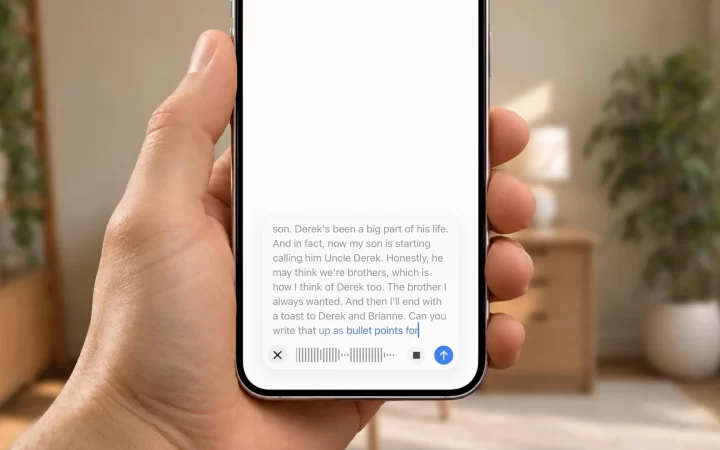
ChatGPT Live Dictation transcribes speech as you speak, letting you review and edit the text before sending a prompt. OpenAI is rolling out the feature globally across ChatGPT plans and its web, desktop, iOS, and Android apps.
- ChatGPT Live Dictation displays a text transcript while you speak, rather than making you wait until recording ends.
- You can reveal the live transcript by tapping or clicking the audio waveform, then edit the text in the prompt box.
- OpenAI is rolling out the feature globally on all ChatGPT plans across web, desktop, iOS, and Android.
What changed
ChatGPT Live Dictation changes when users can see a spoken prompt’s transcription. Instead of waiting for the recording to finish before the words appear, users can watch speech turn into text in real time.
The Verge reports that the feature is rolling out globally to every ChatGPT plan. It is available on the web, in the desktop app, and in the ChatGPT apps for iOS and Android.
While dictating, users can tap or click the audio waveform to display the transcript being generated. Once they finish, they can edit the text directly in the prompt box before submitting it to ChatGPT.
The change builds on ChatGPT’s existing ability to accept microphone input. The supplied report describes the new capability as faster and more reliable dictation, with the main visible difference being that the text appears as the user speaks.
Why it matters
Live transcription gives people an earlier chance to check what ChatGPT understood. That matters when a spoken prompt includes wording the user wants to correct before sending, because the transcript can be reviewed and edited in the prompt box.
The feature also reduces one part of the wait involved in dictating a message: users no longer need to wait until recording ends to see the text take shape. It does not remove the need to review a prompt, but it makes that review possible during the dictation process.
Analysis: The practical benefit is a smoother path from speech to an editable ChatGPT prompt, particularly for users who prefer speaking to typing. The source does not specify changes to ChatGPT’s answers, microphone permissions, or how audio is handled, so those points should not be inferred from the live transcript feature alone.
Who is affected
The rollout applies to ChatGPT users on all plans, according to The Verge’s report. Because OpenAI is making it available across web, desktop, iOS, and Android, the change is not limited to one device type or operating system.
People who already use ChatGPT dictation can check whether their interface shows the live text when they tap or click the waveform. Users who mainly type prompts may see little change to their routine, since the described feature concerns microphone dictation.
The supplied report does not give a separate schedule by country, account, or app version. It describes the rollout as global and underway, so availability may be something users need to check in the ChatGPT interface rather than assume from a particular plan.
What to watch next
As the rollout proceeds, the immediate question for users is whether the live transcript appears in their version of ChatGPT and whether they can edit it before sending. The Verge identifies the waveform as the control for showing the text, making that the clearest feature to look for.
It is also worth distinguishing a live transcript from a completed ChatGPT response. The reported change concerns converting a user’s spoken input into text; it does not say that ChatGPT begins answering before the user finishes speaking.
Analysis: Watch for further detail from OpenAI on how the feature behaves across its different apps, since the report confirms the platforms but does not describe interface differences or additional controls. Until then, users should rely on what appears in their own ChatGPT app and review the transcript before submitting a prompt.
Frequently asked questions
What does ChatGPT Live Dictation do?
It converts spoken input into text while the user is speaking. The transcript can be shown during dictation and edited in the prompt box before submission.
Where is Live Dictation available?
The feature is rolling out globally on all ChatGPT plans, on the web, desktop app, and iOS and Android apps. The supplied report does not provide a more detailed rollout schedule.
How do you see the Live Dictation transcript?
Tap or click the audio waveform while using dictation to show the text ChatGPT is generating. You can edit the transcript in the prompt box when you are done speaking.
The TechnoRapper editorial desk used The Verge’s report as the source for the rollout, supported platforms, and described dictation controls; analysis is labeled separately and does not add unreported product details.
Related on TechnoRapper
- NVIDIA RTX Spark desktops bring local AI to compact Windows PCs
- Nvidia CEO Return Bid Stalls as Board Keeps Huang Review Open
- DGX Spark cluster: NVIDIA DGX Spark Adds a Four-Node Local Cluster for Research
- Slurm quantum integration: NVIDIA’s Slurm Update Simplifies Quantum Processor
- Google’s AI-free school search gap puts student choice in focus
Inspired by: The Verge AI
How we used the source: facts, quotes, and numbers in this article come only from that Inspired by link. We added structure, search intent, and reader context. We did not independently verify the reporting.
Permanent link · https://technorapper.com/2026/11/chatgpt-live-dictation/